R-PRO-1
Apollo R PRO-1 PoE mmWave Multisensor with LD2412 Module
SG Seller, Ready Stock in Singapore
Buy on Shopee → Set-up guide and documentation (Apollo wiki) → LD2412 fitting guide (Apollo wiki) →Overview
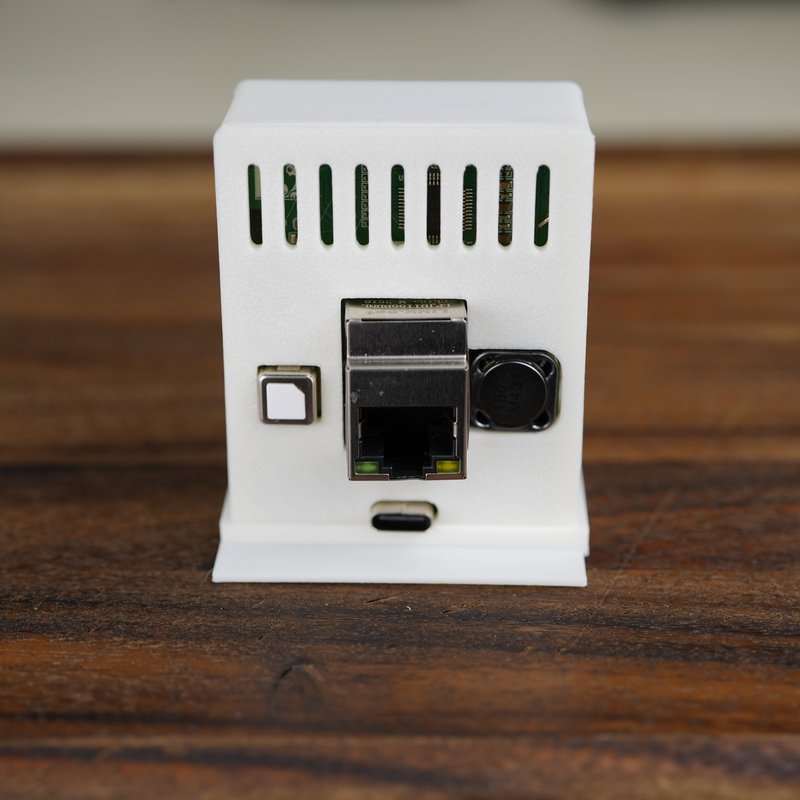
The R PRO-1 is Apollo's wired presence sensor. One RJ45 connection carries power and data over PoE, and a USB-C port is there as the other way to power it. ESPHome is flashed at the factory, and the HLK-LD2450 radar is fitted to the board.
SHG sells the R PRO-1 as a set with one LD2412 mmWave module. The module comes unfitted in the same package and you push it on to the board yourself.
The board also has an LTR390 ambient light sensor, addressable RGB LEDs, a piezo buzzer and a rear expansion port. Like Apollo's other sensors it is fully local and open source, with no cloud subscription.
Why Two Radars
The LD2450 on the board tracks moving targets across zones you define in its field of view. It reaches about 6 metres with a 120 degree horizontal field of view, and supports up to three zones.
The LD2412 adds still presence detection, which is what picks up someone seated or resting. It tracks a single target, reaches about 9 metres and has a 150 degree horizontal field of view. Both radars cover 70 degrees vertically.
With both fitted, a Combined Presence entity reports Detected when either radar sees a target.
Fitting the LD2412
The module is loose in the package. Apollo's guide gives these steps:
- Unplug the R PRO-1 from power and remove the back.
- Lift the board out of the case and turn it over.
- Push the LD2412 on to the 4-pin and 3-pin headers. It only fits one way.
- Put the board back in the case and snap the lid on.
Ships on Wi-Fi Firmware
The R PRO-1 leaves the factory on Wi-Fi firmware, so set it up over Wi-Fi first. Then open the device in Home Assistant, set Firmware Type to Ethernet and press Firmware Update.
That step downloads the Ethernet firmware from GitHub, so the sensor needs internet access while it runs. On an IoT VLAN with no route out, the switch will not work until you allow that access. Apollo documents a serial reflash over USB as the fallback.
What Is In the Box, and What Is Not
The set holds the R PRO-1, assembled in its case with the LD2450 fitted, and one LD2412 module, not fitted. Nothing else is supplied:
- No Ethernet cable.
- No USB-C cable.
- No power supply and no PoE injector.
- No mount. The case has a flat foot and stands on a flat surface.
Power it from a PoE switch or injector, or from a USB-C supply of 5 V 2 A or larger.
The set has no CO2 sensor and no humidity sensor. The R PRO-1 is for indoor use.
Technical Specifications
| Model | R PRO-1, set with one LD2412 module |
|---|---|
| Radar 1 | HLK-LD2450, fitted. About 6 m, 120° horizontal, 70° vertical, up to 3 zones. |
| Radar 2 | LD2412, supplied unfitted. About 9 m, 150° horizontal, 70° vertical, single target. |
| Light | LTR390 ambient light (lux) sensor |
| Indicators | Addressable RGB LEDs, piezo buzzer |
| Microcontroller | ESP32-S3 |
| Network | Ethernet (RJ45) with PoE, or 2.4 GHz Wi-Fi |
| Bluetooth | Tracking and Improv Wi-Fi provisioning |
| Power | PoE, or USB-C from a 5 V 2 A or larger supply. None supplied. |
| Firmware | ESPHome, preinstalled. Ships as the Wi-Fi build; Ethernet build selected from Home Assistant. |
| Expansion | Rear expansion port |
| Use | Indoor |
Home Assistant and ESPHome Set-up
Power the sensor over USB-C and it opens its own Wi-Fi hotspot. Join the hotspot and enter your Wi-Fi details, or use Improv over Bluetooth from Home Assistant. Home Assistant then finds the sensor through the ESPHome integration, and you add it and assign an area. Switch to the Ethernet firmware after that if you want the wired connection.
Apollo publishes the firmware configuration on GitHub, so you can take the device into your own ESPHome set-up and change it. Updates install from a Firmware Update entity in Home Assistant. The sensor can also work as a Bluetooth proxy if you add that component yourself through ESPHome.
Singapore Compliance
The R PRO-1 sensor is IMDA-registered equipment, Equipment Registration ESER/26/6082, legally imported into Singapore by 2MAG PTE. LTD. under IMDA Telecommunication Dealer's (Class) Licence DA/26/0184.
SG Seller. Ready Stock in Singapore, on our Shopee store.
There is more about the maker on our Apollo Automation page.
FAQ
Is the LD2412 already fitted?
No. It is in the package but not on the board. You open the case and push it on to the headers, following the steps above.
Does Ethernet work as soon as I plug it in?
No. The sensor ships on Wi-Fi firmware. Set it up over Wi-Fi, then change Firmware Type to Ethernet in Home Assistant. The sensor needs internet access for that change.
Can I use it without PoE?
Yes. It takes power over USB-C from a 5 V 2 A or larger supply, and it can stay on the Wi-Fi firmware it ships with.
Is a mount included?
No. The case stands on its own foot on a flat surface. No mount comes with the set.